Welcome
Here I go hosting these link parties every week and have NEVER offered a tutorial on how to link up to one. Or the expectations of the party. Or what they even are!
Well, today it’s time to change that. So many new bloggers are coming on board asking worthy questions and we all start somewhere. So here’s my take on:
All about Link Parties
Part 1 – Party Etiquette
Part 2 – How to link up to a party
Part 3 – Should you start your own and how.

~ How to link up your post ~
Every weekend during SNS, I open up my inlinkz directory and go through all the links on SNS. ALL of them. What I’m looking for here is that you’ve entered your post addresses.
This is different than your blog home page address and is important to get right because later down the line, visitors will click on your link and not be able to find your original post. That’s frustrating.
My hunt will now be a thing of the past, because a new inlinkz feature allows me to only allow linkups that you have lead to your particular post. If you link up your blog home page, you will not be able to link up, however you will be able to try again the right way.
What is it?
Wrong
https://www.funkyjunkinteriors.net/
Right
https://www.funkyjunkinteriors.net/2011/04/would-you-live-in-this-barn.html
Note: If you’re on a .com, wordpress, or blogger domain, your end extensions will be different. For Blogger, all posts end with the html.
How to do it
1. Build your post and publish it. Your post is now given it’s own address, url or permalink. (same thing)

2. Copy the entire http address that is on your own screen. This is how mine would show.
How to copy
Select the text by clicking on it, and when it’s highlighted, edit/copy.
Keyboard shortcuts
mac: hold command/select C
pc: hold ctrl/select C

3. Visit the link party desired and select the Add your link button.

4. When it opens, add the following info. (see above)
To paste your post url, click in the URL area, then edit/paste.
Keyboard shortcuts
mac: hold command/select V
pc: hold ctrl /select V

5. After you add your info, it will read like this.
Click next step, then select your thumbnail (which pops up) and you’re done!
Thumbnail: Taking a tight crop of your pic = more hits!
Name: I have lots of characters enabled so you can also include your blog name in the Name area if you wish. I myself prefer this less anonymous approach however it isn’t mandatory.

What’s the RED X for?
That little red X that pops up beside your thumbnail enables you to delete your own link if desired.
~ How to link back to the party ~
Linking back to the host blog is just good party etiquette. Your link will alert your readers to the party, which is the ultimate thank-you back to the party host. Some hosts want you to link back, while others don’t mind if you don’t. The majority of hosts prefer that you do though.
How to link with buttons

1. Funky Junk’s buttons are located under the main header above. Select BUTTONS.

2. Choose the button of choice, and copy the url inside the scroll box.

3. While working on your post, select Edit HTML.
4. Paste the button html into your posting area.

5. Select COMPOSE to view the button to make sure it works.
You can now resize or move the button anywhere in your post as desired.
How to link with text

1. Type in your desired text.
2. Highlight by clicking and dragging, then select LINK.

3. Add in either: the party post url or the blog home page url. Your call. I always use proper party urls myself however either will work fine.
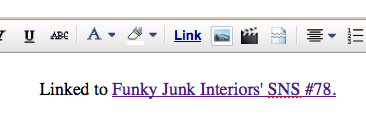
4. Select OK. Your linked text will now be in purple. You are linked up!
Tip: for the themed linkups, I suggest the specific party url so the link back will lead your visitors to the right theme.
Tip: SNS buttons all automatically link back to Funky Junk’s home page. You can change this by selecting the button / LINK / add your chosen url / OK. You may have to do it twice for it to work.
Any other things you’d like to discuss about link parties in general?
Any suggestions on how to improve SNS?
How are you enjoying the themed linkups?
Watch for answers in the comments!